Label-Free Feature Learning
This section describes how to train SimSiam models on both real-domain and Fourier-domain.
The goal is to learn domain-specific embeddings that capture image-quality features (e.g., vitreous ice, crystalline ice, contaminants, and support film) without using labels.
1. Download Pretrained Weights
Before training, download the pretrained ResNet-50 backbone weights from the official SimSiam repository:
mkdir -p pretrained_weights
wget https://dl.fbaipublicfiles.com/simsiam/models/100ep/pretrain/checkpoint_0099.pth.tar -P pretrained_weights/
Using pretrained weights speeds up convergence and stabilizes representation learning.
If you prefer to train from scratch, you can omit the --resume flag in the commands below.
2. Training on Real-Domain Images
Train the SimSiam model on real-space micrograph images:
prismpyp train \
  --output-path output_dir/real \
  --metadata-path metadata \
  --resume pretrained_weights/checkpoint_0099.pth.tar \
  --rank 0
Tip
You may adjust the --batch-size and --workers arguments based on GPU memory and available CPU cores. See here for other options.
3. Training on Fourier-Domain Images
For Fourier-space inputs, we just add the --use-fft flag and change the output path:
prismpyp train \
  --output-path output_dir/fft \
  --metadata-path metadata \
  --resume pretrained_weights/checkpoint_0099.pth.tar \
  --use-fft
Warning
In (multi-)distributed processing, the --dist-url argument is used for processes to communicate with each other. If you are running multiple jobs at the same time (e.g., training on real domain and Fourier domain images simultaneously), you will need to provide different --dist-url arguments for each job so that they do not try to access the same port.
4. Notes on Checkpoints
If you’d rather start from scratch or use your own pretrained model, omit the --resume flag or point it to a different .pth.tar checkpoint.
During training, per-batch loss and collapse level are printed in the terminal. After training completes, the following outputs will be found under your specified --output-path:
| Output | Description |
|---|---|
checkpoints/model_best.pth.tar |
Model with lowest total loss |
checkpoints/model_lowest_collapse.pth.tar |
Model with lowest collapse metric |
checkpoints/model_last.pth.tar |
Final epoch checkpoint |
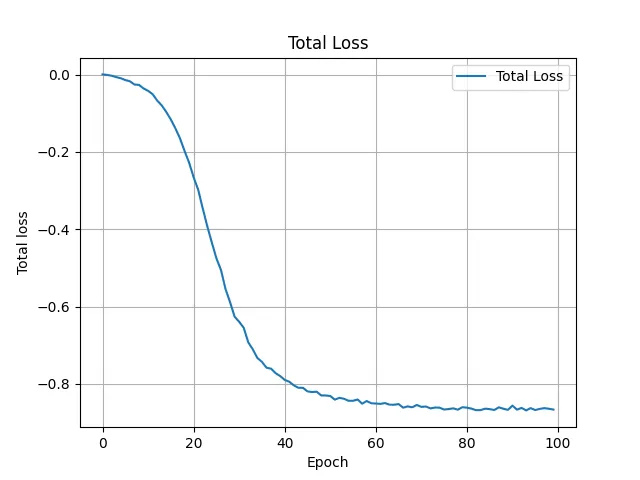
total_loss.webp |
Plot showing total loss per epoch (lower is better) |
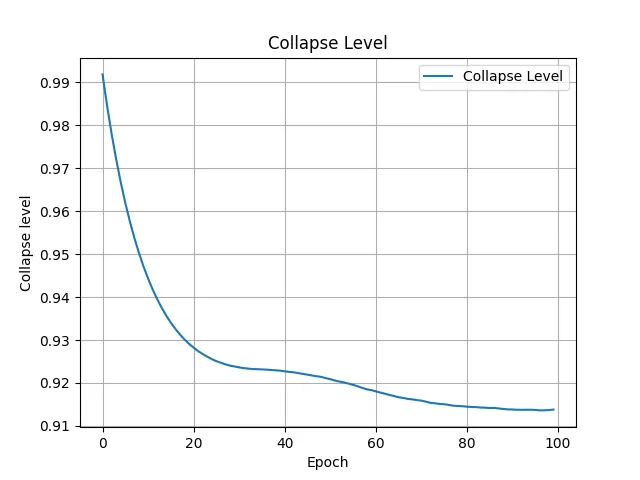
collapse_level.webp |
Plot showing collapse metric per epoch (higher is better) |
training_config.yaml |
Copy of training parameters used for reproducibility |
5. Diagnostic Outputs
If training converges, the total_loss.webp plot should look something like this:
If the model successfully learned to extract meaningful semantics from the input image, the total collapse plot can plateau, decrease, but should not approach 0:
Your models are now trained and ready for embedding generation!